
The best cheap smart bulbs for most people are the Kasa KL135 and the WiZ A19 Color. Both work without a hub, cost a few dollars each when bought in a multipack, require no monthly subscription, connect to standard 2.4GHz Wi-Fi, and work with both Alexa and Google Home. You can have either one set up and voice-controlled in about ten minutes.
That’s the short answer. But if you’ve ever stared at a shelf full of smart bulbs wondering what the difference actually is, which ones are going to fight your Wi-Fi, or whether you’re about to accidentally buy something that only works with Alexa, keep reading. I’ll walk you through everything you actually need to know.
Why Smart Bulbs Are the Best First Smart Home Device (Especially for Renters)
I got into smart home gear one device at a time, and a smart bulb was one of the very first things I added. The reason is simple: there’s nothing to install. You screw it in, download an app, and you’re done. No wiring, no drilling, no asking your landlord for permission. For renters especially, that matters a lot.

Smart bulbs are also genuinely useful in a quiet, daily-life kind of way. Being able to turn a lamp off from bed without getting up sounds like a small thing, and it is. But small things add up. Schedules, dimming, voice control, turning everything off when you leave the house: these are the features people actually use, and cheap smart bulbs do all of them without any premium price tag.
The one honest caveat: smart bulbs work best when the wall switch feeding them stays in the ON position. The bulb needs constant power to stay connected to your Wi-Fi. Flip the switch off and it loses its connection and becomes just a regular lamp until power comes back. This surprises a lot of new users, and I’ll cover the fix later. It is not a dealbreaker, but it is the one thing worth knowing upfront.
The Quick Answer: My Top Picks at a Glance
For most people starting out, here is where I’d point you:
- Best overall for most people: Kasa KL135 (color, 2.4GHz, no hub, works with Alexa and Google)
- Best for Alexa-only households on the smallest budget: Amazon Basics Smart A19 Color Bulb
- Best for a slightly more polished app experience: WiZ A19 Color Smart Bulb
- Best if you want Matter compatibility built in for the future: Govee RGBWW A19 Smart Bulb
- Best pure white/dimmable pick if color isn’t your thing: Kasa KL110
Now let me explain what makes each one earn or not earn its spot.
The Main Roundup: Best Cheap Smart Bulbs Reviewed
Kasa KL135: The One I’d Point Most Beginners Toward
Kasa is made by TP-Link, and it has been one of the most reliably recommended budget smart bulb brands for years. The KL135 is the color version: 16 million colors, 1000 lumens of brightness (brighter than most budget color bulbs), 2.4GHz Wi-Fi only, no hub required, and it plays nicely with both Alexa and Google Home. The Kasa app is straightforward and rarely throws a fit during setup.
The setup process mirrors what TP-Link documents on their official support page: screw in the bulb, make sure your phone is on 2.4GHz, open the Kasa app, add a device, and follow the blinking pattern to confirm pairing mode. The whole thing takes under ten minutes when your Wi-Fi is behaving. The most common setup hiccup is being connected to a 5GHz band on your phone during setup, and I’ll explain exactly how to fix that in the section below.
One honest note: the Kasa app requires a TP-Link account, which is normal for this category but worth knowing going in. There is no subscription fee for the standard features, which includes schedules, voice control, and remote access.
The KL135 comes in single packs and multipacks, and the per-bulb price drops meaningfully when you buy two or four at once. If you’re doing more than one room, the multipack is the smarter buy.

- 【Multicolor & Auto White】Dimmable 16 million colors and 1000 lumens warm to cool whites(2500K-9000K). Set your bulb to a…
- 【Voice & App Control】Hands-free light control via Amazon Alexa/Google Assistant. Use free Kasa app (iOS, Android) to adj…
- 【Energy Monitoring & Scheduling】Real-time energy tracking helps reduce consumption without sacrificing quality (60W equi…
WiZ A19 Color Smart Bulb: The Polished Runner-Up
WiZ is owned by Signify, the same company behind Philips Hue, but WiZ operates as a completely separate, more affordable product line with no hub requirement. The A19 Color bulb is 800 lumens, full color, 2.4GHz Wi-Fi, and works with Alexa, Google Home, and Apple HomeKit. That last one matters: it’s one of the few budget color bulbs that legitimately supports Apple’s ecosystem without jumping through hoops.
The WiZ app has a slightly slicker feel than the Kasa app, and WiZ’s “SpaceSense” motion detection feature, which can trigger lights based on motion sensed through the bulb’s own radio, is a genuinely clever bonus. You can browse the full WiZ bulb lineup on the WiZ connected products page to see which sizes and base types fit your fixtures.
One consideration: WiZ bulbs are often priced a little higher per bulb than comparable Kasa options, though the gap tends to close during sales. If you’re in an Apple ecosystem, WiZ is probably the better call. If you’re fully Alexa or Google, either brand works.
Govee RGBWW A19 Smart Bulb: The Matter Pick
Govee has been aggressively expanding its smart home lineup, and the RGBWW A19 smart bulb is their entry into Matter territory. Matter is the newer open smart home standard managed by the Connectivity Standards Alliance, and in plain English it means the device is designed to work across Alexa, Google Home, and Apple HomeKit without brand-specific workarounds. If you’re building a mixed-ecosystem home or you want future-proofing built in at a budget price, the Govee is worth a look.
That said, a few honest caveats. Govee’s app has historically gotten mixed reviews, with some users reporting that color consistency between multiple bulbs in the same room can vary. At the budget tier, this is not unusual, but it’s worth knowing if you’re planning to buy a bunch for one space. Also, Matter support at the budget tier is still relatively new. For a pure beginner who just wants to turn a lamp on and off with their voice, it may be more than you need. But if you want to spend a few extra dollars now and avoid ecosystem headaches later, the Govee makes sense.
Amazon Basics Smart A19 Color Bulb: The Budget Floor, With a Big Asterisk
Amazon Basics makes a very affordable color smart bulb, and if you are all-in on Alexa and you have an Echo device already, it works well at a low per-bulb price. Setup is frictionless because the bulb pairs directly with the Alexa app using Amazon’s Frustration-Free Setup on supported Echo devices.
Here is the asterisk: this bulb works with Alexa only. Not Google Home. Not Apple HomeKit. If you switch ecosystems later or you share a home with someone on a different platform, the Basics bulb becomes a problem. For anyone who might ever use Google or Apple gear, skip this one and spend slightly more on the Kasa or WiZ. The Basics bulb earns its spot only when you are firmly committed to the Alexa world and want the absolute lowest entry price.
- 【Multicolor & Auto White】Dimmable 16 million colors and 1000 lumens warm to cool whites(2500K-9000K). Set your bulb to a…
- 【Voice & App Control】Hands-free light control via Amazon Alexa/Google Assistant. Use free Kasa app (iOS, Android) to adj…
- 【Energy Monitoring & Scheduling】Real-time energy tracking helps reduce consumption without sacrificing quality (60W equi…

- Size- 31G x 4mm (5/32”)
- Ease of use
- Universal-Fit Connection

- 16 Million DIY Colors: Govee smart light bulbs own millions of color and 54 preset scene modes, you can explore your fav…
- Music Sync: Our smart light bulbs change color and brightness simultaneously when sounds are detected by the microphone …
- Smart Control: Govee color changing light bulbs make it possible to control your bulbs with simple voice commands. And y…

- Dimmable Kasa Smart’s dimmable light bulb has a dimming range from 1 percent to 100 percent; Set the right brightness fo…
- No hub required: The Kasa smart Wi-Fi light bulb, dimmable connects to your home’s secure WiFi network; No need for a hu…
- Control from anywhere: Control your smart light bulb from anywhere with your smartphone using the case smart app (iOS, A…
The Specs That Actually Matter (and the Ones That Don’t)
Most budget smart bulb spec sheets try to impress you with numbers you’ll never actually use. Here is what genuinely matters for day-to-day use.
Lumens, not watts. Lumens measure how bright the bulb actually is. A 60-watt equivalent LED typically produces around 800 lumens. For a bedside lamp, 800 is plenty. For a living room ceiling fixture you’re using as a main light source, look for 1000 lumens or more. Wattage on an LED is just the energy draw, not brightness. A 9-watt smart LED producing 800 lumens is doing the same job as an old 60-watt incandescent, for a fraction of the electricity.
On that note, the ENERGY STAR smart lighting page is worth bookmarking if you’re curious about efficiency. Smart lighting that’s earned the ENERGY STAR certification uses less energy both when it’s on and when it’s in standby mode, which leads into the next point.
Standby power draw. Smart bulbs draw a small amount of power even when “off,” because the Wi-Fi radio needs to stay live. Typically this is in the range of 0.2 to 1 watt. That is genuinely tiny and will not meaningfully affect your electricity bill, so do not let it scare you off the category. You will save far more energy switching from incandescent to LED than you’ll spend on standby draw.
2.4GHz Wi-Fi. Every mainstream budget smart bulb on this list requires 2.4GHz Wi-Fi, not 5GHz. This is the single most common setup failure point, and it is very easy to fix. More on this in the setup section.
Hub requirement. None of the bulbs on this list require a separate hub. They connect directly to your home Wi-Fi. If you ever see a budget bulb requiring a Zigbee hub, factor that cost in.
Subscription. None of these brands charge a mandatory subscription for basic features. You can set schedules, use voice control, and control the bulb remotely for free. Some brands offer optional premium features, but the core functionality costs nothing beyond the bulb itself.
Color temperature vs. color changing. “Tunable white” means you can adjust between warm yellow light and cool daylight white. “Color changing” means you also get red, green, blue, and everything in between. If you mostly want ambiance and you don’t care about party colors, a white-only bulb like the Kasa KL110 is cheaper and does the job. The color-changing models are worth it if you want scenes and mood lighting.
The CRI (Color Rendering Index) number tells you how accurately the bulb renders colors on objects in the room.
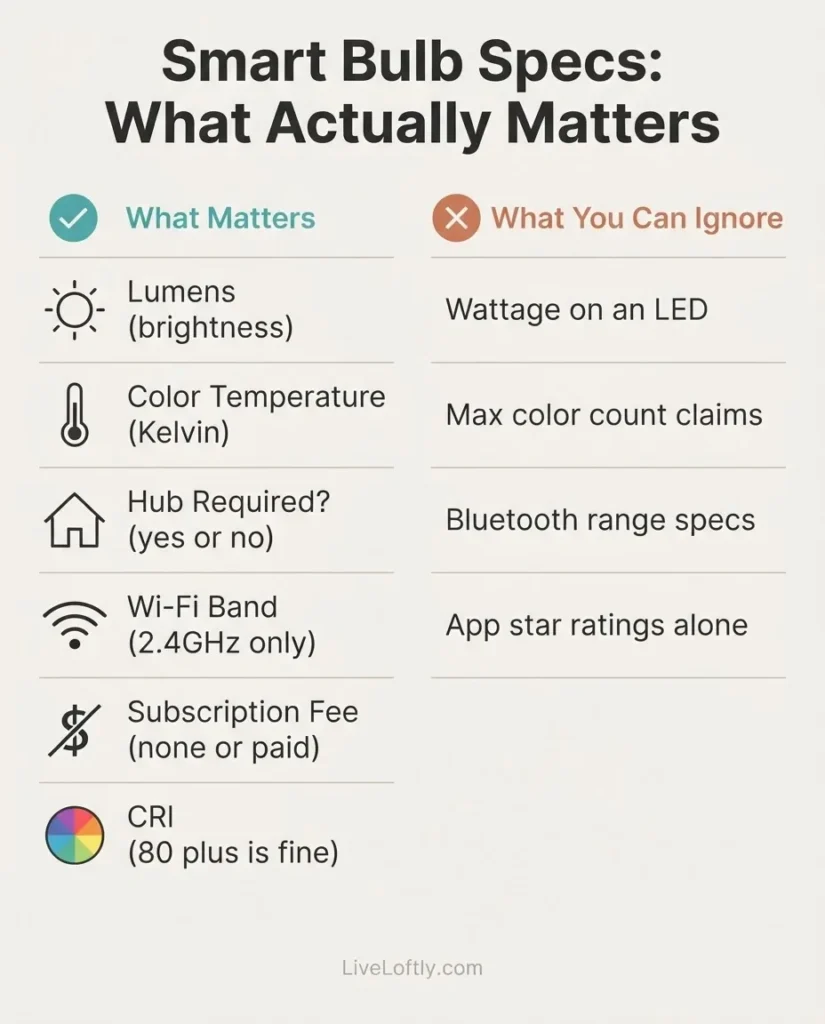
Above 80 is generally fine for a home. Above 90 is noticeably better if color accuracy matters in a workspace. Most budget bulbs are in the 80s, which is perfectly acceptable.
How to Set Up a Smart Bulb: The Short Version
Setting up a budget Wi-Fi smart bulb follows essentially the same pattern regardless of brand.
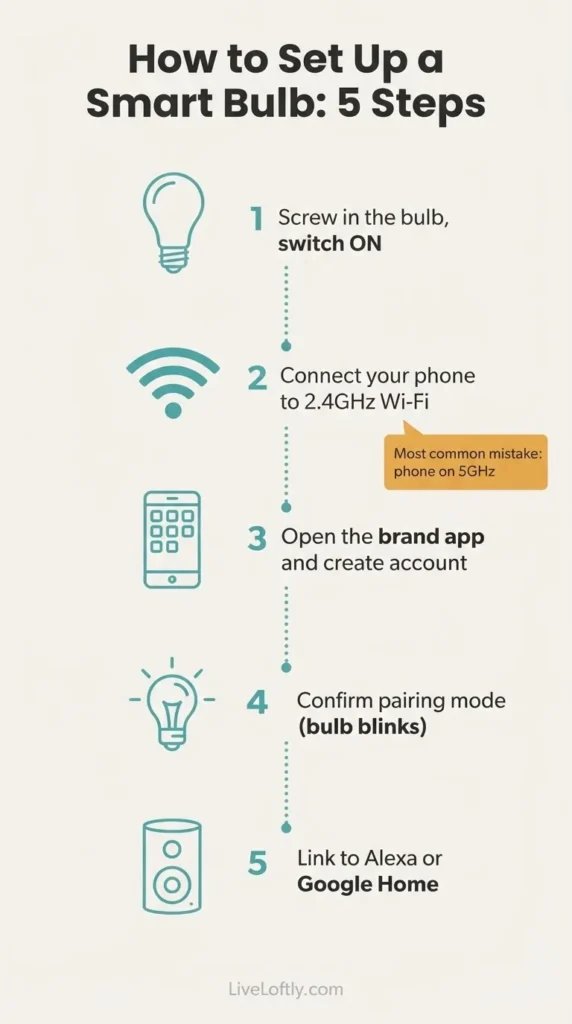
First, screw the bulb in and make sure the wall switch is in the ON position. The bulb should flash or pulse when it powers up, which means it is in pairing mode. If it doesn’t flash, try flipping the switch off and on three times slowly (about one second between each), and it should reset into pairing mode.
Second, before you open the app, check which Wi-Fi network your phone is connected to. This is the step most people miss. If your phone is on a 5GHz band (often named something like “MyNetwork_5G”), the app will not find the bulb because the bulb only speaks 2.4GHz. Switch your phone to the 2.4GHz band first. As Intel’s reference guide on 2.4GHz vs. 5GHz explains, 2.4GHz travels further and penetrates walls better, which is exactly why smart home devices use it, though it does max out at a lower top speed than 5GHz (which you don’t need for a light bulb anyway).
Third, open the brand’s app, create an account if needed, and follow the in-app steps to add a device. The app will handle the rest. For Kasa specifically, the official TP-Link setup guide walks you through each screen and even tells you what to do if your phone shows an “unsecured network” warning during pairing (it’s normal and you just tap “connect anyway”).
After setup, you can optionally link the bulb to Alexa or Google Home by going into the relevant app and enabling the brand’s skill or service. Once linked, “Alexa, turn off the bedroom lamp” just works.
The Wall Switch Problem (and the Simple Fix)
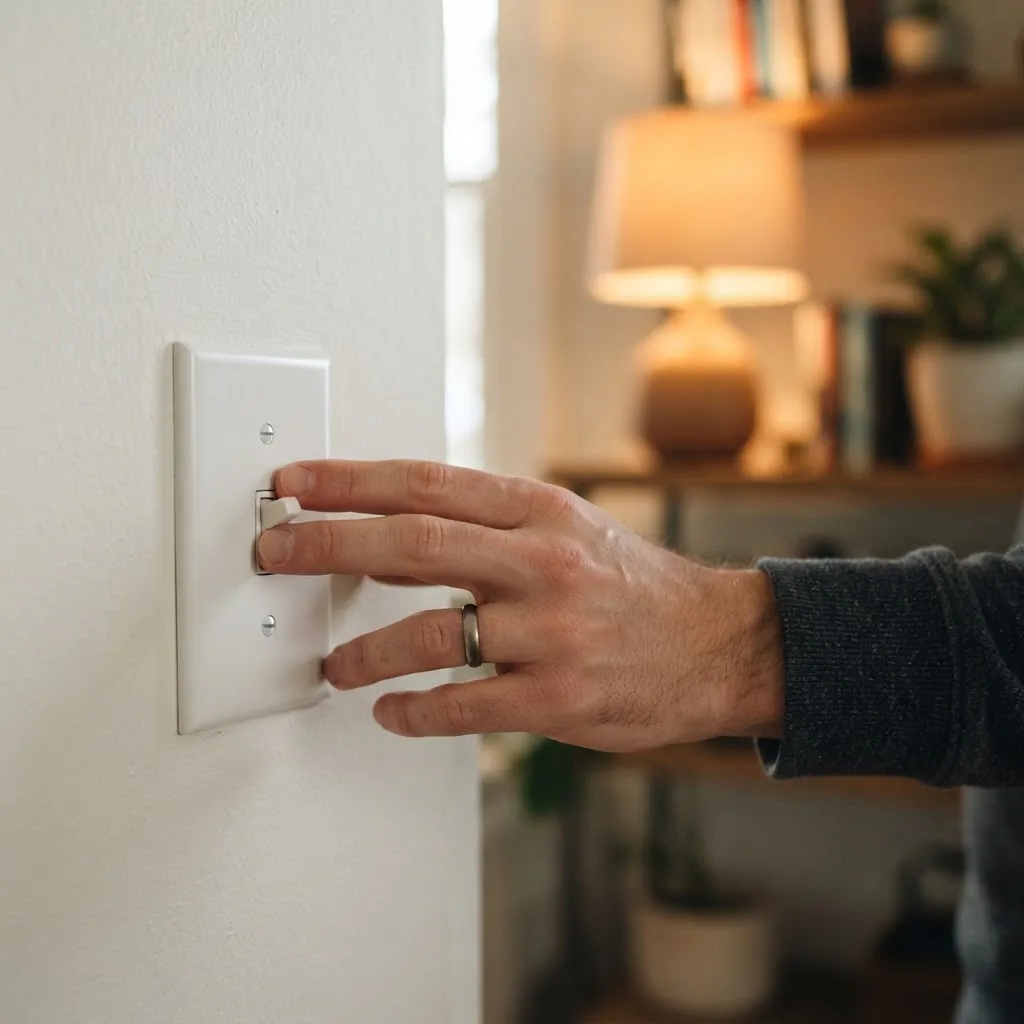
This trips up almost everyone who is new to smart bulbs. The issue is this: a smart bulb needs constant power to stay connected. The moment someone flips the wall switch off, power cuts, the Wi-Fi connection drops, and the bulb becomes a regular lamp until the switch goes back on.
The simple fix is to leave the switch always on and control the light through the app, voice assistant, or a schedule instead. But if someone in your house keeps reaching for the switch out of habit, there are two practical solutions. The first is a smart switch cover or “switch guard,” a small plastic clip that fits over the switch and physically prevents it from being flipped off while still looking normal on the wall. The second option is adding a smart plug to a floor lamp instead of using a ceiling fixture with a wall switch at all, which sidesteps the problem entirely. For renters in particular, a floor lamp on a smart plug is often a cleaner solution than dealing with ceiling fixtures.
Ecosystem and Compatibility: Which Bulbs Work with What
If you are in an Alexa household, every bulb on this list will work. If you are in a Google Home household, Kasa, WiZ, and Govee all work well. If you are in an Apple HomeKit household, WiZ is your cleanest budget option. If you want something that works across all three without relying on brand-specific skills, look at Matter-compatible options like the Govee RGBWW.
A word on Matter, since it comes up a lot. Matter is an open connectivity standard built to make smart home devices work across different ecosystems without brand lock-in. It is managed by the Connectivity Standards Alliance, and at the budget bulb level it is still relatively new. In practical terms for a beginner: if you buy a Kasa or WiZ bulb today and you’re happy in your current ecosystem, you do not need to wait for Matter.
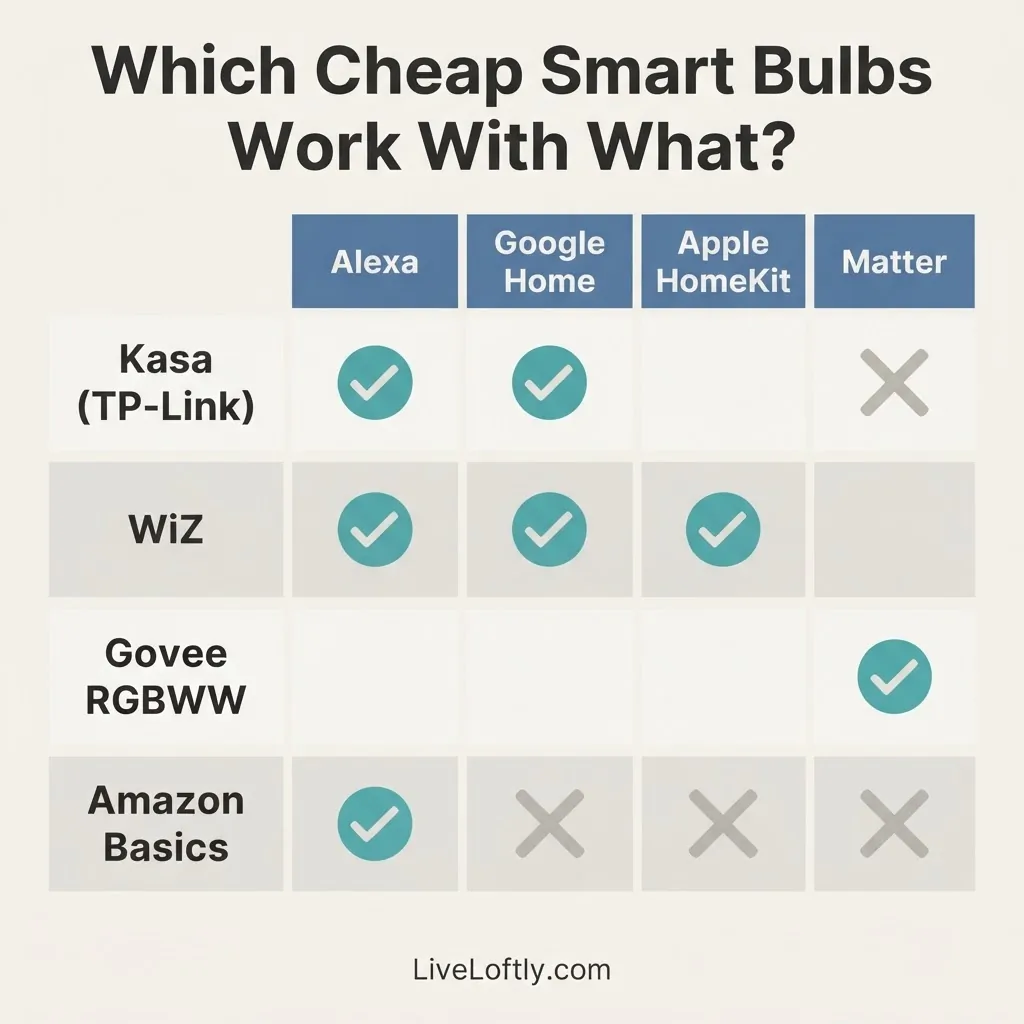
But if you want built-in future flexibility and you’re already drawn to Govee’s price point, the Matter-enabled model is worth the extra few dollars.
Important: Skip Sengled Right Now
This is a fresh warning that most buying guides haven’t caught up to. As of August 1, 2025, Amazon permanently removed the Sengled Alexa skill after months of repeated cloud outages. Sengled bulbs that relied on cloud connectivity no longer work with Alexa voice commands or routines. If you see Sengled bulbs still listed at an appealing price, skip them. They are not a safe buy for Alexa users at this time. This is exactly the kind of situation I mean when I say that a cheaper device that works reliably beats one that keeps breaking down.
Do Cheap Smart Bulbs Save Energy?
Yes, meaningfully, but mostly because they’re LEDs, not specifically because they’re smart. A 9-watt smart LED doing the same brightness work as an old 60-watt incandescent is already saving you about 85% on that bulb’s energy use. The “smart” scheduling features add on top of that: if you set a schedule to turn lights off when you leave the house and you actually use it, you’ll see the benefit in your electricity bill over time.
The standby draw (the tiny amount of power the Wi-Fi radio uses while the bulb is “off”) is real but tiny, typically well under a watt. The ENERGY STAR smart lighting guidance confirms that smart lighting uses less energy both on and in standby compared to the incandescent bulbs they replace, so the energy story on smart LEDs is genuinely positive.
Worth It or Skip It: My Honest Verdict
Smart bulbs genuinely earn their spot for renters, beginners, and anyone who wants smart lighting without touching a single wire or paying a monthly fee. They are the easiest, most reversible, and most beginner-friendly entry point in the smart home category.
Within the budget tier, my verdict is that the Kasa KL135 is the most reliably recommended starting point for most people. The WiZ A19 Color is the right call for Apple users or anyone who wants a slightly smoother app. The Govee RGBWW earns its place if Matter is on your radar. The Amazon Basics bulb is fine inside a pure Alexa setup but is too limiting for anyone else.
What I’d skip: any color bulb priced so low it has zero reviews or a brand name you’ve never heard of. The category is flooded with generic bulbs that look great in product photos and fall apart within months, app and all. Paying a few dollars more for a brand with a real support page and a track record is absolutely worth it here. As noted above, skip Sengled for now entirely.
FAQ: Quick Answers to the Questions I See Most Often
Do cheap smart bulbs require a hub?
No. Every bulb on this list connects directly to your home Wi-Fi network. You do not need a Zigbee hub, a Bridge, or any extra hardware. Just an E26 socket, the brand’s free app, and a 2.4GHz Wi-Fi connection.
Do smart bulbs need a monthly subscription?
No mainstream budget smart bulb brand charges a mandatory subscription for basic functionality. You get scheduling, voice control, remote access, and dimming for free. Some brands have optional premium tiers, but the core features cost nothing beyond the upfront price of the bulb.
Why won’t my smart bulb connect during setup?
The most common reason is that your phone is connected to a 5GHz Wi-Fi band. All budget smart bulbs are 2.4GHz only. Switch your phone to your router’s 2.4GHz band before you open the setup app. If the bulb still won’t enter pairing mode, try flipping the wall switch off and on three times slowly to reset it.
What happens when someone turns off the wall switch?
The bulb loses power, loses its Wi-Fi connection, and behaves like a regular lamp until power is restored. The fix is to leave the switch always on and use the app, a voice assistant, or a schedule for control instead. A switch guard clip is a cheap, renter-friendly way to physically prevent accidental switch-offs.
Are cheap smart bulbs a security risk?
Like any connected device, smart bulbs live on your home network and communicate with cloud servers. Sticking to established brands with real privacy policies reduces your exposure significantly. For most everyday users, using a reputable brand and keeping the app updated is sufficient. If you want extra isolation, some people put smart home devices on a separate guest network, which most modern routers support.
The Bottom Line
Starting with a smart bulb is the right call. There’s no wiring, no landlord conversation, no subscription, and no hub to buy. Screw it in, follow the app, and you’ve got a working smart light in ten minutes. From there, everything else in your smart home gets easier because you’ve learned the pattern: 2.4GHz, pairing mode, one app, one ecosystem.
The Kasa KL135 is where I’d start for most people. The WiZ A19 is the runner-up if you’re on Apple. Both of them quietly do exactly what a good smart bulb should: make your daily life a little easier without asking you to think about them.