
For most beginners and renters, Wyze Bulb Color or Govee’s RGBWW A19 bulbs offer the most practical value: no hub required, no subscription, and straightforward app setup. Philips Hue is the better long-term pick if you plan to build a larger, more advanced smart home over time. Which one you should buy depends on what you want your lights to actually do, and how much you want to spend getting there.
Let me walk you through all three, honestly.
A quick note before we dive in: This post contains affiliate links. If you buy something through one of my product links, I may earn a small commission at no extra cost to you. I only recommend products I’d genuinely point a friend toward.
Why I’m Comparing These Three Specifically
These three brands come up constantly in the same breath because they represent three very different points on the smart bulb spectrum. Wyze is the budget pick. Govee sits comfortably in the middle, with a lot of color personality. Philips Hue is the premium ecosystem with the premium price tag to match. People ask me all the time whether Hue is actually worth it or whether a much cheaper Wyze or Govee bulb does basically the same thing. The honest answer is: it depends, and I’ll explain exactly on what.
If you’ve been staring at the smart bulb aisle wondering why one four-pack costs roughly the same as a nice dinner out and another costs less than a pizza, this is the article for you.
What You Actually Need to Know Before Buying Any Smart Bulb
Before I compare brands, let me clear up the two things that trip up first-timers the most.
The 2.4GHz Wi-Fi thing. Every single smart bulb on this list, including all three brands here, connects using your 2.4GHz Wi-Fi band. Not 5GHz. Not 6GHz. Just 2.4GHz. Most home routers broadcast both bands at once, and that’s fine. But if your router has a setting that combines both bands under one network name, and your phone happens to be on 5GHz when you try to set up a bulb, setup can fail or just behave oddly. If a bulb won’t pair, the first thing to check is always which band your phone is connected to. Switch it to 2.4GHz, try again, and most of the time the problem disappears.
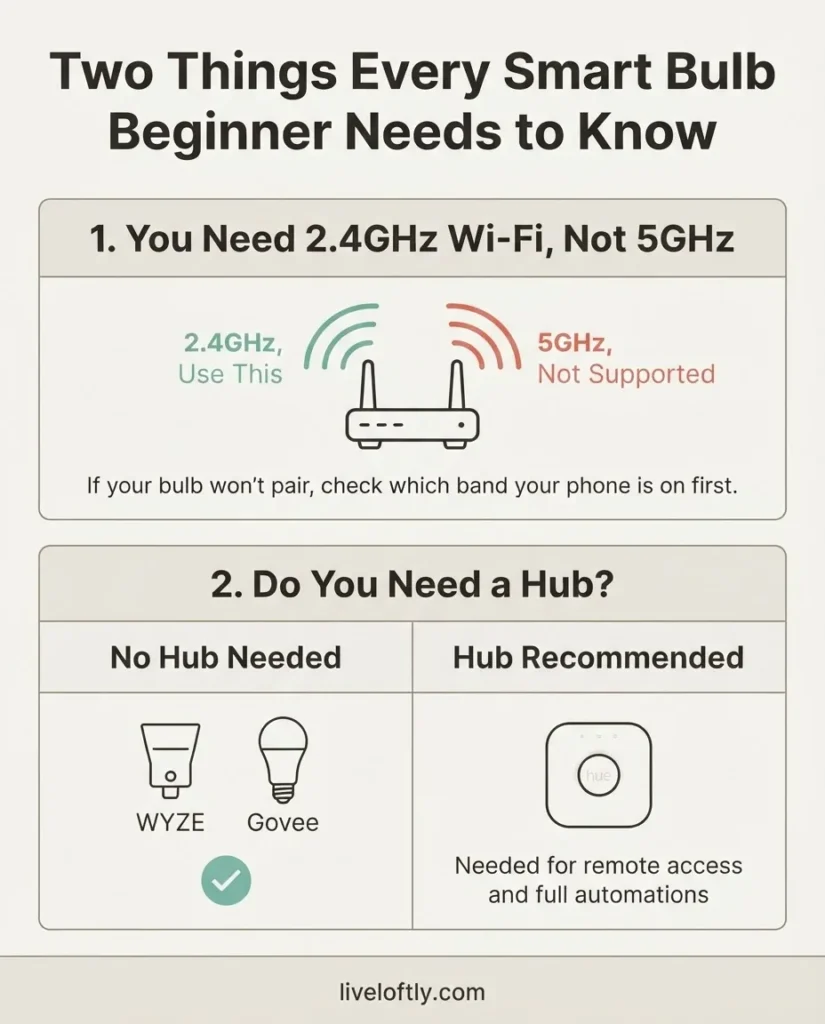
This trips up more people than any firmware issue ever will.
The hub question. A “hub” or “bridge” is a small box that sits in your home and acts as a translator between your bulbs and your router. Philips Hue built their entire original system around one. Wyze and Govee do not require one. Whether you need a hub matters because it affects both your upfront cost and your setup complexity. I’ll get into exactly where Hue lands on this in its section below, because the answer has changed recently with Matter.
Wyze Bulb Color: The Smart Budget Pick
Wyze is where a lot of people start their smart home journey, and I get it completely. The appeal is simple: you get a genuinely capable color-changing bulb at a price that makes trying smart lighting feel low-risk. If you’ve never owned a smart bulb before and you’re not sure if you’ll actually use the color-changing features or the scheduling, Wyze lets you find out without committing serious money.
The Wyze Bulb Color is an A19 E26 bulb, meaning it fits the same socket as a standard 60-watt bulb. It puts out up to 1,100 lumens, which is actually brighter than most competitors in this class (many top out at 800 lumens). That matters in a real room. A bulb that can get genuinely bright makes a real-use difference, not just a spec-sheet one. It covers 1800K to 6500K color temperature, so you can go from a very warm amber reading-light feel all the way to a cool, daylight-style white for work or cooking. And it has a 90+ CRI rating, which means colors in the room look more natural and less washed out compared to lower-quality LEDs.
Setup is all done through the Wyze app, using Bluetooth to get the initial pairing done, then handing off to your 2.4GHz Wi-Fi. No hub required, full stop. The official Wyze support documentation confirms it works with both Amazon Alexa and Google Assistant out of the box, so if you already have an Echo or a Google Nest on a shelf somewhere, you can be controlling your lights by voice the same afternoon you install the bulbs. Apple Home is not supported natively, so if you’re in the Apple ecosystem, note that.
The subscription question is worth addressing directly: there is no subscription for Wyze bulbs. Wyze does sell a paid plan called Wyze Cam Plus, but that is for camera features. Bulb use is completely free. Schedules, automations, color scenes, vacation mode, all of it works with the free Wyze app.
Where Wyze falls a little short is app polish and ecosystem depth. The Wyze app works, but it’s designed to support a wide range of products (cameras, sensors, locks, robots) and the lighting controls are not as refined or as thoughtfully laid out as Philips Hue’s dedicated lighting app. Automations are doable but feel more basic. And Wyze does not support the Matter standard, which means it lives in its own ecosystem and can’t be natively shared with, say, Apple Home or Samsung SmartThings. For most beginners that won’t matter at all. But if you’re building a more mixed smart home down the road, it’s worth knowing.
Wyze Bulb Color: Worth It or Skip It? Worth it, especially for a first-time buyer, anyone on a tight budget, or a renter who wants simple “screw it in and it works” smart lighting without spending a lot.

- WYZE WLPA19C-2 LED SMART HOME COLORED LIGHT BULBS – TWO-PACK
Govee Smart Bulbs: A Lot of Personality for the Price
Govee occupies an interesting space. They’re not quite as cheap as Wyze and not as expensive as Hue, and they bring a focus on visual drama that the other two don’t quite match. If you want a bulb that can do rich, vivid color scenes for a home theater setup, a gaming room, or just a living room with a little more atmosphere, Govee’s A19 RGBWW bulbs are worth a look.
The RGBWW designation means these bulbs cover both RGB color and a warm-to-cool white spectrum. Govee’s A19 offering hits around 1,000 lumens at full brightness, puts out color through 16 million color options, and runs through the Govee Home app. Setup is via Bluetooth-assisted Wi-Fi pairing on your 2.4GHz network, no hub required. For smart bulb setup guidance, Govee’s own documentation covers the pairing process clearly for both Android and iOS users.
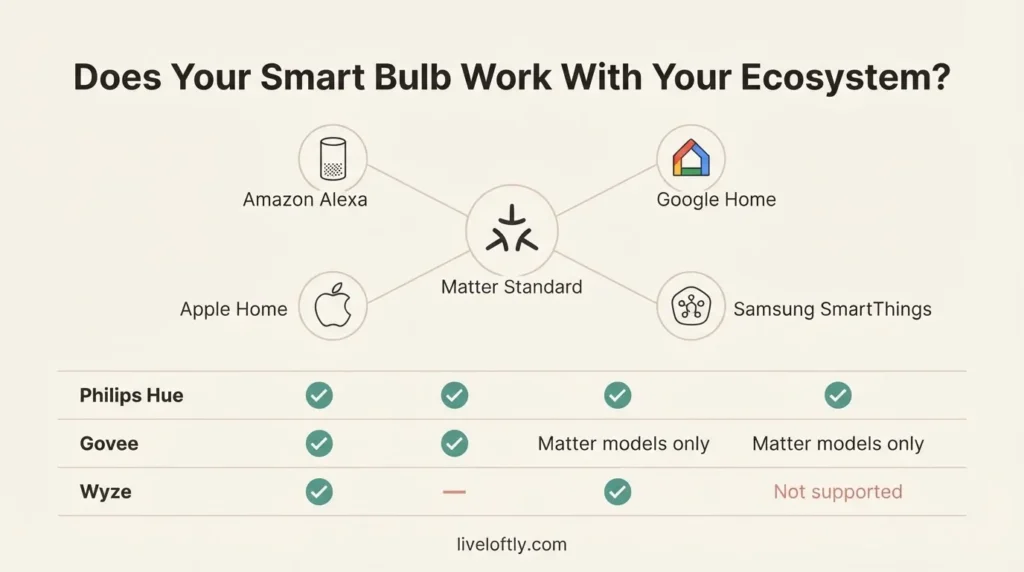
One of Govee’s more significant recent moves is adding Matter support to their newer A19 lineup. Matter is the universal smart home standard developed by the Connectivity Standards Alliance, and the CSA’s Matter FAQ explains it simply: it allows devices from different brands to work together in the same smart home without needing a brand-specific hub. For a practical buyer, that means Govee’s Matter-compatible bulbs can be added to Apple Home, Google Home, Alexa, and Samsung SmartThings. That’s a meaningful upgrade over what most budget bulbs offered even a couple of years ago.
The Govee app has a broader color scene library than Wyze, including music-sync features and a larger palette of preset scenes. Users consistently report that the color richness is a strong point. The tradeoff is that the app experience can feel feature-heavy, which is great if you enjoy digging into lighting customization but can feel like too much if you just want a simple schedule and a warm white for evenings.
Subscription situation for Govee bulbs: basic app control, color changing, scheduling, and Alexa/Google integration are all free. Some premium effects and advanced dynamic scene features exist in a paid tier on certain Govee product lines, but for standard A19 color bulbs, the free app covers everything most people will use. Worth confirming on whichever specific model you buy, but the core functionality is free.
Govee: Worth It or Skip It? Worth it if color scenes and atmosphere are a priority, or if you want Matter compatibility at a budget price. A mild skip if you just want simple on/off and warm white scheduling, where Wyze gives you equivalent basics for less.
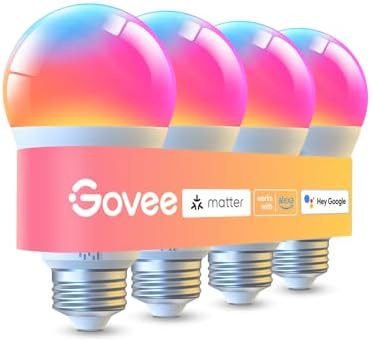
- Higher Brightness: With over 1000 lumens (120V), these smart bulbs can brighten large space for your home. Get high brig…
- Millions of Color Options: Select from 16 million colors and 1-100% dimmable brightness to make your space feel more vib…
- Light It Your Way: With Govee Home App, you can access up to 54 scene modes for your Wi-Fi light bulbs. Music Mode lets …
Philips Hue: Is the Premium Actually Worth It?
Let me be honest with you: Philips Hue costs significantly more than the other two. A Hue starter kit with the Bridge and four Color Ambiance bulbs runs at a premium price tier, and individual replacement bulbs are priced well above what Wyze or Govee charge per bulb. That’s the real question this whole comparison is built around: is Hue worth paying more for?
For some people, absolutely yes. For others, honestly no.
What Hue does better than anyone else:
The Hue ecosystem is the most mature smart lighting platform you can buy. The Bridge (and the newer Bridge Pro released in 2025) connects all your bulbs locally in your home, which means they respond faster, work reliably even when the internet goes out, and support more sophisticated automations than you’ll find anywhere else. The Hue app is genuinely excellent, with thoughtful daily routines (like Sunrise, which gradually increases light intensity to help you wake up naturally), precise color control, and a syncing feature that ties your lights to on-screen content if you use the Hue Sync Box. Hue bulbs are rated to 25,000 hours of life. The ecosystem supports Alexa, Google Home, Apple Home, and Samsung SmartThings all at once.
The Philips Hue Bridge is also how Hue connects to Matter. As the official Philips Hue Matter setup guide explains, there are now two ways to use Hue with Matter: through the Bridge (which exposes all your Hue bulbs to any Matter-compatible platform), or directly with the newer Matter-native Essential bulbs (which connect without a Bridge but with some feature limitations). If you want the full Hue experience, including advanced scenes, remote access, and whole-home automations, you want the Bridge.
The “do I need the Bridge” question answered plainly:
Newer Hue bulbs support Bluetooth, which means you can set them up and control them entirely through your phone without the Bridge, as long as you’re within Bluetooth range. That sounds great until you want to turn the lights on from your car before you get home, or set them on a schedule while you’re at work. Remote access and reliable scheduling require either the Bridge or a Matter-enabled Thread Border Router (like an Amazon Echo 4th generation or a Google Nest Hub 2nd generation). The Philips Hue Bridge buying guide on the official Hue site lays this out well, and I think it’s worth reading before you buy.
For renters or people starting with just one or two bulbs, the Hue Bridge cost adds up quickly when you factor it into your per-bulb investment. If you’re buying six bulbs and plan to add more, the Bridge math starts making more sense. If you’re buying two bulbs for a bedside lamp and want simple voice control, that same money goes further with Wyze or Govee.
Subscription situation for Hue: There is no subscription required for Philips Hue lighting features. Automations, scenes, schedules, and ecosystem integrations are all free. This is worth knowing because some premium smart home brands have moved to subscription gates on features, and Hue has not.
Philips Hue: Worth It or Skip It? Worth it if you’re building a multi-room smart home and want an ecosystem that will grow with you, a polished app, reliable local control, and the best long-term compatibility story. Skip it (for now) if you’re just starting out with a single room and you’re not sure smart lighting will stick in your life.

- WHAT’S IN THE BOX – Includes one Hue Bridge and four Hue White and Color Ambiance smart 75W A19 light bulbs suitable for…
- UNLOCK THE FULL POWER OF HUE WITH THE INCLUDED BRIDGE – Enjoy automations control from anywhere in the world, and a secu…
- ENJOY PRESET SCENES – Light your routines throughout the day; Set a 24-hour natural light scene that mimics the sun or c…
Side-by-Side: How They Actually Stack Up
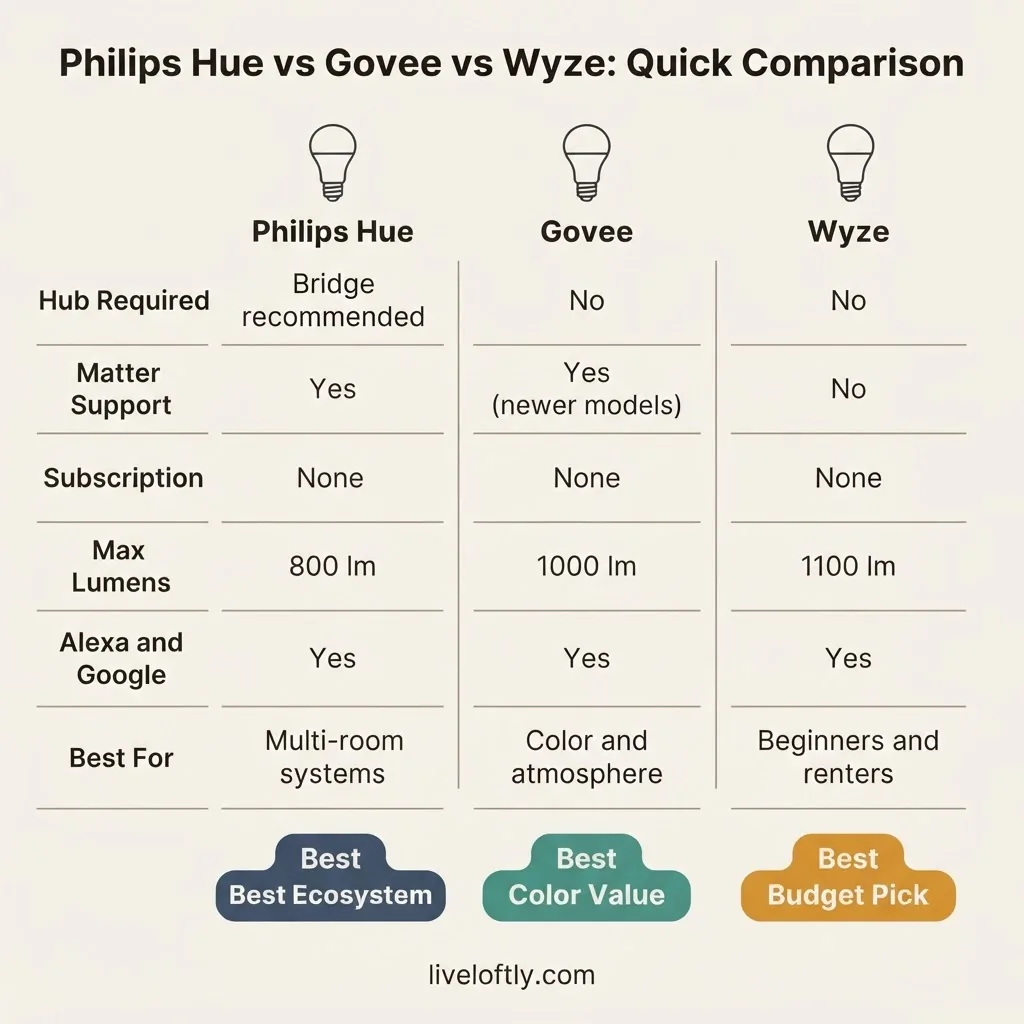
Sometimes you just want to see it all in one place, so here it is.
| Philips Hue | Govee RGBWW A19 | Wyze Bulb Color | |
| Hub required? | Bridge recommended; Matter-direct optional | No | No |
| Max brightness | 800 lm (standard) | 1,000 lm | 1,100 lm |
| Color temp range | 2000K-6500K (Color Ambiance) | ~2700K-6500K + RGB | 1800K-6500K + RGB |
| Matter support | Yes (via Bridge or newer Essential bulbs) | Yes (newer models) | No |
| Alexa/Google | Yes | Yes | Yes |
| Apple Home | Yes | Yes (Matter models) | No |
| Subscription | None | None (for basic use) | None |
| Lifespan rating | Up to 25,000 hrs | Not widely published | 25,000 hrs |
| CRI | Not prominently listed | Not prominently listed | 90+ |
| Price tier | Premium | Mid-range | Budget |
| Best for | Multi-room, long-term ecosystem | Color lovers, atmosphere | First-timers, renters, budget buyers |
Who Should Buy Which: My Honest Recommendation
I’ve laid out the specs, but let me just say it plainly.
Buy Wyze Bulb Color if you’re a first-timer, you’re renting, you want to try smart lighting without a big financial commitment, or you just need a bulb that connects easily to Alexa or Google and lets you set schedules and color scenes. It’s the one I’d confidently hand to someone who texts me “I just want a smart bulb that works and doesn’t cost a fortune.” The 1,100-lumen output means it’s genuinely bright, and the 90+ CRI means your room looks good.

Buy Govee RGBWW A19 if you care about color atmosphere more than anything else, you want Matter compatibility without the Hue price tag, or you’re building a setup for a space where lighting mood matters (a living room, a home theater, a bedroom where you want sunset tones). Users consistently report that Govee’s color depth and scene library are the most expressive in this price range.
Buy Philips Hue if you’re ready to invest in smart lighting as a long-term system rather than a one-room experiment, you want the most reliable local control, the best-in-class app, Apple HomeKit support without workarounds, and an ecosystem you can grow to cover your whole home. The premium cost is real, but so is the quality gap over time.
The one I’d tell most beginners to skip, for now: the full Hue setup. Not because it’s bad, it’s genuinely excellent, but because the Bridge cost on top of the bulb cost makes it hard to justify for someone who isn’t sure yet whether smart lighting will become a real part of their routine. Start with Wyze, see if you use it, and upgrade to Hue when you know you’re committed.
A Real-World Setup Scenario for Renters
If you’re in an apartment with standard E26 sockets, here is exactly what a first setup looks like with any of these three bulbs:
- Download the brand’s app before you even open the box (Wyze app, Govee Home app, or Philips Hue app).
- Make sure your phone is connected to your 2.4GHz Wi-Fi network.
- Screw the bulb into a standard lamp or ceiling fixture with an E26 socket. (No wiring, no tools, no landlord permission needed.)
- Turn the socket on. The bulb will blink or pulse to show it’s ready to pair.
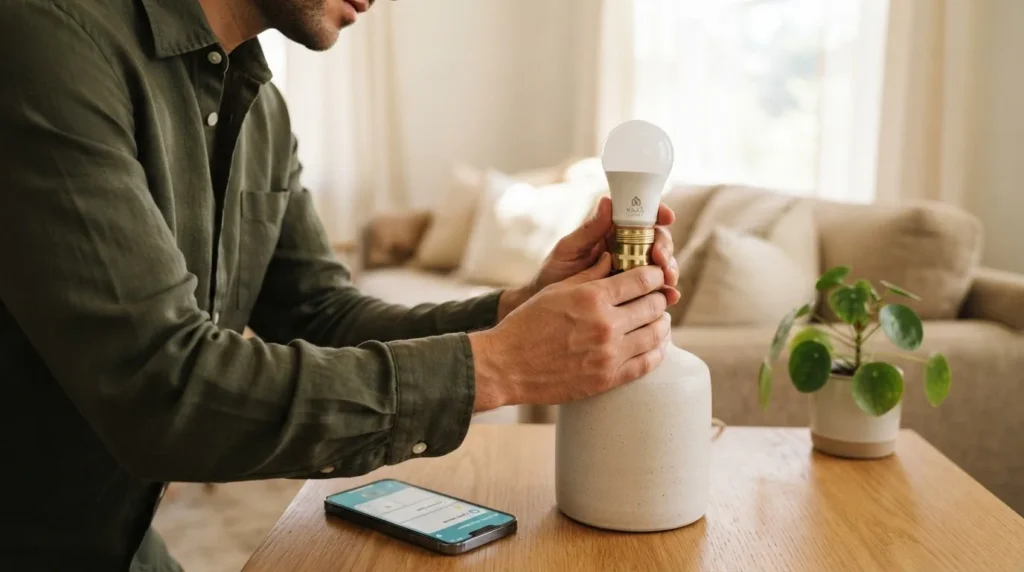
- Open the app, follow the “Add Device” prompts, and enter your Wi-Fi password when asked.
- Once connected, name your bulb, add it to a room, and link to Alexa or Google through that assistant’s app if you want voice control.
That’s it. You’re done. If you run into the bulb-not-pairing issue, nine times out of ten it’s the 2.4GHz Wi-Fi thing I mentioned earlier. Switch your phone to 2.4GHz, put the bulb back in pairing mode (usually by toggling the power three times quickly), and try again.
What About Matter? Do You Need to Care?
If you’re a beginner setting up your first one or two bulbs, you do not need to worry about Matter right now. Matter is a compatibility standard that makes it easier for devices from different brands to work together in a single smart home ecosystem. The Connectivity Standards Alliance FAQ on Matter explains it in plain terms if you want the full picture.
The practical takeaway: if you’re all-in on Alexa or all-in on Google, you don’t need Matter. It only becomes meaningfully useful when you’re mixing brands across ecosystems, like running some lights through Apple Home and some through Google, or when you want to work without cloud dependency. Govee’s newer A19 bulbs support it, Philips Hue supports it, and Wyze currently does not. For most beginners, it’s a nice-to-have that you’ll care more about later, not a make-or-break right now.
Frequently Asked Questions
Do Philips Hue bulbs require a hub?
Newer Hue bulbs can work via Bluetooth without the Bridge, but Bluetooth-only control limits you to in-range phone control with no remote access and no scheduling from away. For full features including remote access, automations, and the best reliability, Philips Hue recommends their Bridge. Some newer Matter-enabled Hue bulbs can connect directly to your smart home ecosystem via a Thread Border Router (like an Echo 4th gen or Nest Hub 2nd gen) without the Bridge, but feature limitations apply.
Do Govee smart bulbs require a subscription?
No. Basic Govee bulb control, including color changing, scheduling, and Alexa/Google integration, is free through the Govee Home app. Some premium dynamic lighting effects exist in a paid tier on certain Govee products, but standard use of the A19 color bulbs does not require a subscription.
What Wi-Fi do smart bulbs need?
All three brands covered here, Philips Hue, Govee, and Wyze, require a 2.4GHz Wi-Fi network for Wi-Fi pairing. They do not support 5GHz. Most modern routers broadcast both bands at once, so this is not usually a problem. If setup is failing, check that your phone is connected to the 2.4GHz band before pairing.
Is Wyze a reliable smart bulb brand?
From what users consistently report, Wyze Bulb Color is a reliable everyday choice. It’s Energy Star and UL certified, which matters for safety and energy compliance. The most common issue reported is the occasional need to re-pair after a Wi-Fi outage, which is typical of Wi-Fi bulbs across brands.
Which smart bulb is easiest to set up for beginners?
Wyze and Govee are the easiest because they require no hub and no additional hardware. You download the app, screw in the bulb, and follow the in-app setup. Philips Hue is easy too, but if you’re using the Bridge, you need to set that up first. For a beginner with just one or two bulbs, Wyze is the most friction-free starting point.
The Bottom Line
There is no single “best” smart bulb for everyone. What there is, is the right bulb for your situation, your budget, and how much you actually want to do with it.
If you want to dip your toes in without risk, Wyze. If you want color-rich atmosphere with Matter on a budget, Govee. If you’re building a smart home for the long haul and want the best ecosystem in the business, Philips Hue.
And if none of them earn their spot in your home? Send them back. That’s always an option, and it’s exactly the standard I hold everything to.