
Most smart bulbs do not need a hub. If you pick a Wi-Fi smart bulb, you screw it in, connect it to your home’s Wi-Fi network through a free app, and you are done. No extra box, no extra cost, no complicated setup. That said, some smart bulbs do require a hub, and a handful of features are only unlocked when a hub is in the picture. Knowing which is which saves you a wasted trip back to the store.
Here is the plain-English breakdown so you can buy with confidence the first time.
What Even Is a Hub? (And Why People Get Confused)
This is where the confusion starts, so let’s clear it up before anything else.
A hub is a small device that sits on your shelf or plugs into your router and acts as a translator between your smart bulbs and the rest of your home. Some smart lighting systems, like Philips Hue, use a wireless protocol called Zigbee to talk between bulbs. Zigbee is reliable and low-power, but it cannot speak directly to your home Wi-Fi. The hub is the translator that bridges that gap.
The thing is, most people use the words “hub,” “bridge,” and “router” interchangeably, which makes everything more confusing. Your Wi-Fi router is not a hub. Your Amazon Echo or Google Nest speaker is not technically a hub either, though it can help coordinate things.
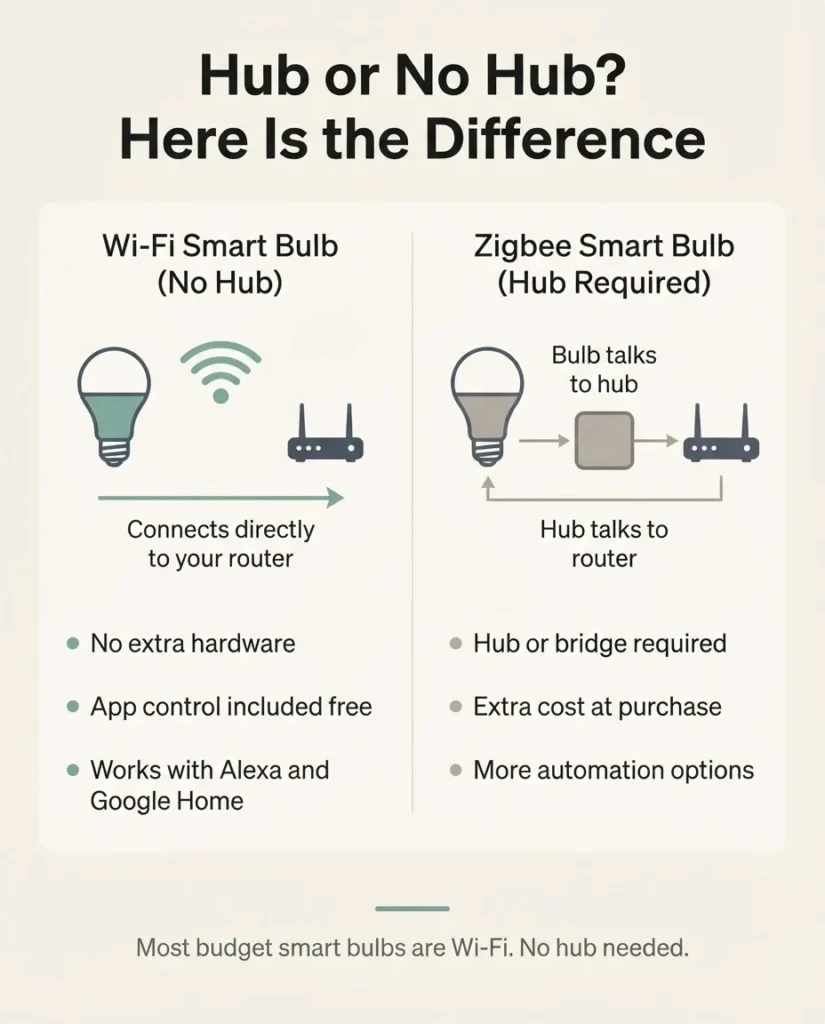
A hub is a specific piece of hardware designed specifically for smart home communication. Most beginners never need to think about one at all.
The short version: if a bulb says “Wi-Fi” on the box and nothing else, it almost certainly does not need a hub. If it says “Zigbee” or “Z-Wave,” it likely does.
The Three Types of Smart Bulbs (and Which Ones Need a Hub)
Understanding this took me a while when I was starting out, so here it is simplified.
Wi-Fi bulbs connect directly to your home wireless network through the same router your phone and laptop use. No extra hardware needed. You download the brand’s app, follow a short setup process, and the bulb is live. This is by far the most common type you will find at a budget to mid-range price point, and it is the right starting point for almost everyone. Brands like Kasa by TP-Link, Wyze, Govee, GE CYNC, WiZ, and Feit Electric all offer Wi-Fi bulbs with no hub required.
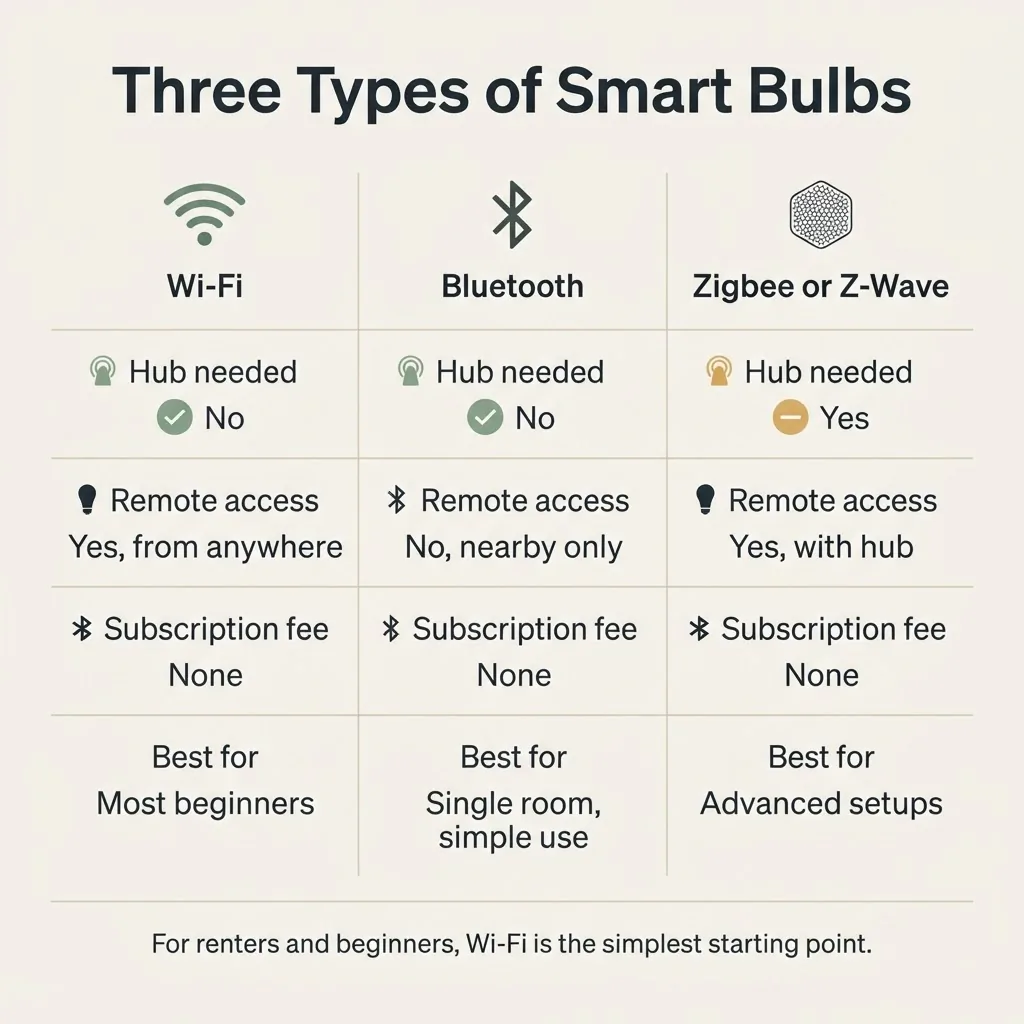
Bluetooth bulbs pair directly to your phone, similar to wireless headphones. They are simple to set up and work even without an internet connection. The catch is range: you typically need to be within about 30 feet of the bulb to control it. That means no turning the lights off from bed if the lamp is in the next room, and no remote access when you are away from home. As LIFX explains in their comparison of Bluetooth vs. Wi-Fi smart bulbs, Bluetooth is great for basic, simple setups, but it limits automation and remote access in a way that most people find frustrating after a few weeks.
Zigbee and Z-Wave bulbs are the ones that do need a hub. These protocols are extremely reliable and low-latency, which is why enthusiasts love them. But they cannot connect to your Wi-Fi directly. You need a hub like the Philips Hue Bridge (for Zigbee Hue bulbs) or a SmartThings hub (for Zigbee or Z-Wave bulbs) to make them work. For a first smart home setup or a renter who wants to keep things simple, these are the bulbs I would tell you to skip for now.
What Do Wi-Fi Smart Bulbs Actually Need?
This is the question that really matters, and the answer is shorter than you think.
A Wi-Fi smart bulb needs three things: a working standard household socket (E26, the same screw-in base your regular bulbs use), a 2.4GHz Wi-Fi network, and a smartphone to run the brand’s free app during setup. That is it.
The 2.4GHz part is the one detail that trips up more people than anything else, so let me spend a minute on it. Most Wi-Fi smart bulbs only support 2.4GHz, not the faster 5GHz band. Many modern routers broadcast both bands under the same network name, and your phone might be connected to the 5GHz band during setup, which causes the bulb to fail to connect. If your bulb refuses to pair, this is almost always the reason.
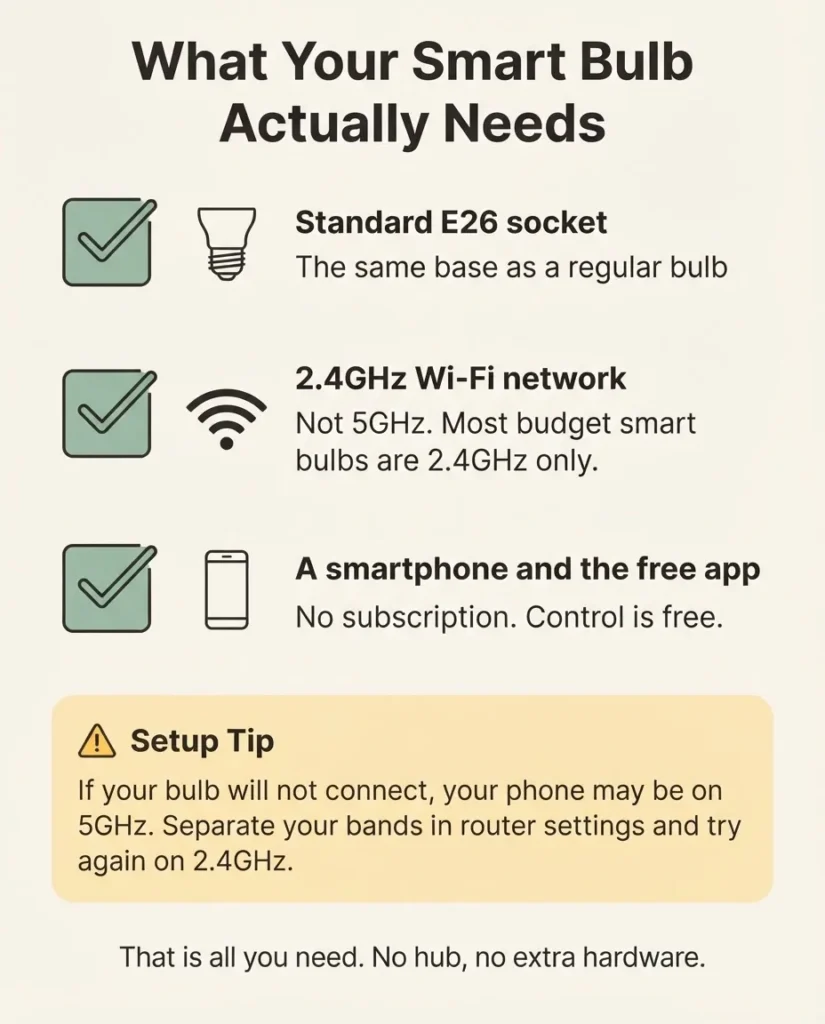
The fix is usually simple: temporarily separate your 2.4GHz and 5GHz networks in your router settings, connect your phone to the 2.4GHz one, and run setup again. Intel’s overview of 2.4GHz vs. 5GHz Wi-Fi explains why the two bands behave differently if you want the full picture, but for setup purposes you just need to know: connect to the 2.4GHz network.
There is also a common worry about subscriptions. Almost every Wi-Fi smart bulb brand offers completely free app control, free scheduling, free automations, and free voice assistant integration. There is no monthly fee to turn your lights on from your phone. The only time a subscription comes up is for premium cloud storage on security cameras, which is a different product entirely.
Do Smart Bulbs Work if Your Wi-Fi Goes Down?
If your Wi-Fi goes down, a Wi-Fi smart bulb still works as a regular light bulb using any wall switch, but app control and voice control will be unavailable until your internet connection is restored. The bulb itself never stops functioning as a light source. It just loses its “smart” features temporarily. For most people, that is a perfectly acceptable trade-off.
Bluetooth bulbs, on the other hand, can still respond to your phone during a Wi-Fi outage as long as you are nearby, since they do not depend on the internet at all.
When a Hub Actually IS Worth It
I said most bulbs do not need a hub, and that is true. But I would not be giving you an honest picture if I did not tell you when a hub makes sense.
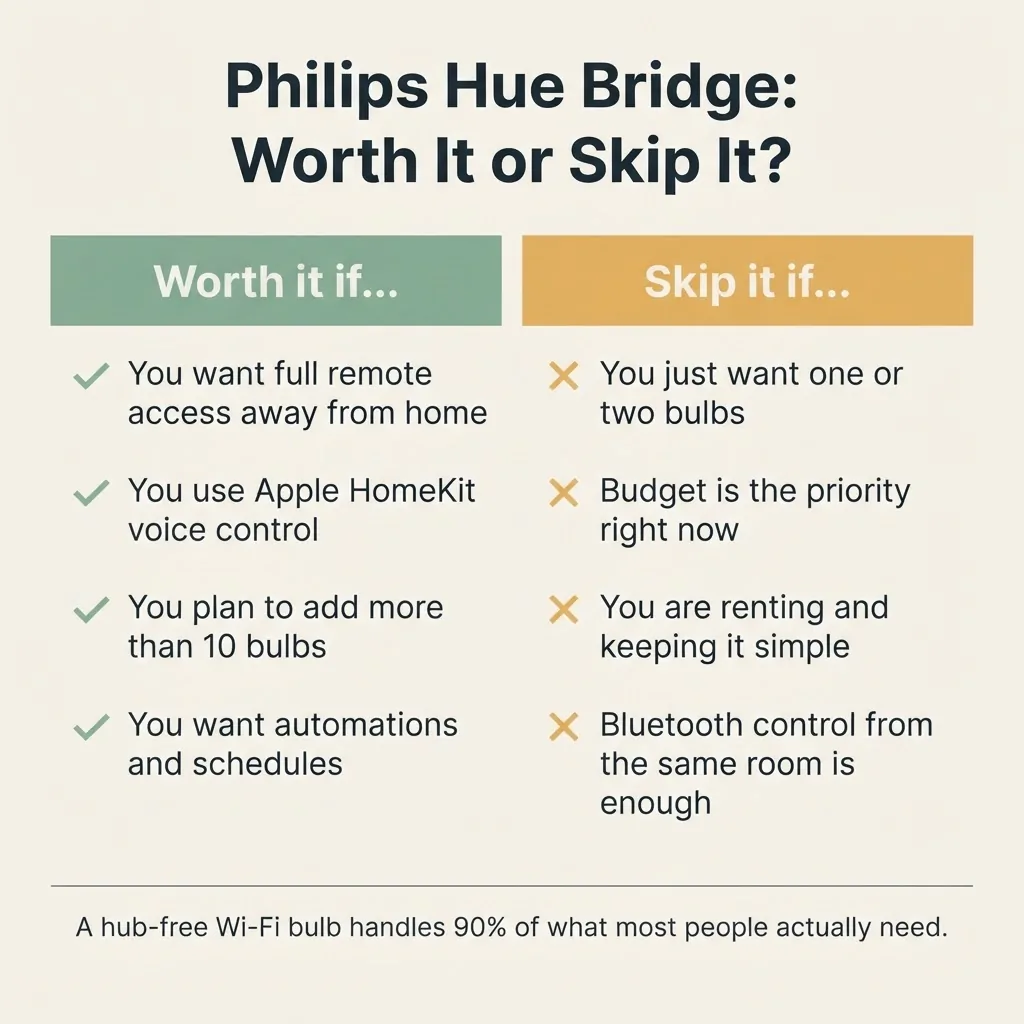
The biggest case for a hub is Philips Hue. Hue bulbs use Zigbee, and according to Philips Hue’s own FAQ, without the Hue Bridge you are limited to controlling up to 10 bulbs locally via Bluetooth only, with no remote access, no voice control through Apple HomeKit, and no automations. The Bridge unlocks the full system: away-from-home control, scheduling, Alexa and Google integration, entertainment sync, and support for up to 50 bulbs on one network. If you want Philips Hue specifically because of the color quality, the reliability reputation, and the deep automation features, the Bridge is worth the extra cost. If you are just starting out and want one smart bulb in a lamp, the Bridge is overkill.
The other scenario where a hub helps is if you want to mix multiple smart home brands and control them all from one place. A SmartThings hub or a Home Assistant setup lets you do that. But that is enthusiast territory, not beginner territory. You do not need to go there on day one, or even day one thousand, honestly.
A Note on Matter: The New Standard Changing All of This
You might see the word “Matter” on newer smart bulb boxes and wonder what it means. Here is the short version.
Matter is a new open industry standard, developed by the Connectivity Standards Alliance, that is designed to make smart home devices work across different ecosystems without the lock-in of older protocols. A Matter-compatible bulb can work with Alexa, Google Home, Apple Home, and SmartThings all at once, without you picking sides.
For Wi-Fi-based Matter bulbs, no hub is required. They connect to your router just like a regular Wi-Fi bulb. For Thread-based Matter devices, you do need a Thread border router, but that is often already built into devices you might own, like a 4th-generation Amazon Echo, an Apple HomePod mini, or an eero Pro 6 router. So it is not a separate purchase for many people.
For right now, if you are just getting started, I would not stress about Matter too much. It is good to see the label on a box because it means longer-term compatibility, but a solid Wi-Fi bulb without Matter will serve you just fine for years.
The Best Hub-Free Smart Bulbs Worth Buying
Here are the hub-free Wi-Fi options I would point someone to, depending on where they are starting from.
My top pick for most people: the Kasa Smart KL135 from TP-Link. It is UL certified for safety, carries a two-year warranty, runs on 2.4GHz Wi-Fi only (no hub), delivers 1,000 lumens of full-color light, and works with both Alexa and Google Home through the free Kasa app. TP-Link’s own Kasa setup documentation walks through the pairing process clearly, and the setup experience is genuinely one of the smoothest in this category. From what users consistently report across thousands of reviews, the Wi-Fi connection stays stable, which is the one thing that matters most in day-to-day use. This is the kind of bulb you set up, forget about, and just control from your phone or with a voice command.

- 【Multicolor & Auto White】Dimmable 16 million colors and 1000 lumens warm to cool whites(2500K-9000K). Set your bulb to a…
- 【Voice & App Control】Hands-free light control via Amazon Alexa/Google Assistant. Use free Kasa app (iOS, Android) to adj…
- 【Energy Monitoring & Scheduling】Real-time energy tracking helps reduce consumption without sacrificing quality (60W equi…
If you want color-changing on a tight budget, the Wyze Bulb Color is hard to argue with for the price. It runs Wi-Fi only, requires no hub, delivers 1,100 lumens, and supports both Alexa and Google. Newer models also support Matter, which is a nice bonus for future-proofing. For setting up smart lights in a rented apartment, it is exactly the kind of low-commitment, low-cost starting point that lets you decide whether you even like smart lighting before you invest more. Google’s own guide to using smart lights with Google Home devices confirms that Wi-Fi bulbs like these connect directly through the Google Home app with no bridge required.
If you want color plus a bit more feature depth, Govee’s RGBWW A19 line adds Matter support, music sync, and a well-reviewed app experience, all without a hub. GE CYNC is another solid choice, especially if you like having both Wi-Fi and Bluetooth on the same bulb so setup is a little more flexible.


One brand I would tell you to skip right now: Sengled. They make decent hardware, but as of mid-2025, there are widespread community reports of cloud server instability and service outages tied to what appears to be serious financial trouble on the company’s side. You can read what users are experiencing in this SmartHome community thread. A smart bulb that cannot connect to its own cloud is just an expensive regular bulb. Skip it until there is more clarity on their situation.
What About Philips Hue Without the Bridge?
It is worth addressing this directly because Hue comes up in almost every smart bulb conversation.
Philips Hue bulbs can technically work via Bluetooth alone, without the Bridge. You screw one in, open the Hue app, and connect via Bluetooth for basic on/off and dimming control. For a single lamp in a bedroom that you just want to control from your nightstand, that actually works fine.
But the Bridge is what makes Hue worth the price premium. Without it, you lose remote access, automations, voice control through Apple HomeKit, and the ability to control more than 10 bulbs. Hue’s hardware quality and color accuracy are genuinely excellent, and the Bridge earns its cost if you are building a full lighting setup. If you are just replacing one lamp bulb and want it to dim on a schedule, a Kasa or Wyze bulb at a fraction of the price does the same job without an ecosystem buy-in.
- 【Multicolor & Auto White】Dimmable 16 million colors and 1000 lumens warm to cool whites(2500K-9000K). Set your bulb to a…
- 【Voice & App Control】Hands-free light control via Amazon Alexa/Google Assistant. Use free Kasa app (iOS, Android) to adj…
- 【Energy Monitoring & Scheduling】Real-time energy tracking helps reduce consumption without sacrificing quality (60W equi…

- WHAT’S IN THE BOX – Includes four White and Color Ambiance smart 75W-equivalent A19 color-changing light bulb; Perfect f…
- UNLOCK THE FULL POWER OF HUE – Add a Hue Bridge to enjoy automations, control from anywhere in the world, and a secure, …
- MILLIONS OF COLORS – The White and Color Ambiance range offers both warm-to-cool white and millions of colors straight o…
Quick Troubleshooting: Why Won’t My Smart Bulb Connect?
If you have already bought a Wi-Fi bulb and it will not pair, here is what to check before assuming the bulb is broken.
The most common issue, by a wide margin, is the Wi-Fi band problem described above. Your phone is probably on 5GHz during setup and the bulb only speaks 2.4GHz. Log into your router settings, separate the two bands temporarily, connect your phone to the 2.4GHz network, and try pairing again.
The second most common issue is that the bulb needs a power cycle before pairing will initiate. Turn the wall switch off and on several times in a row (usually three to five times) to put the bulb into pairing mode. Most brands describe this in the app, but it is easy to miss if you are in a hurry.
If neither of those works, check that the bulb is in a socket that is not controlled by a smart dimmer switch. Smart bulbs and smart dimmer switches generally do not play well together. The bulb needs a full, consistent flow of power to stay connected. A standard on/off switch is fine.
Renters: This Is the Setup for You
I want to call this out specifically because it comes up a lot.
If you are renting, Wi-Fi smart bulbs are the perfect starting point. No drilling, no hardwiring, no permission from a landlord, no extra hardware to install. You screw in the bulb, run the app setup from your phone, and take the bulb with you when you move.

That is it. There is nothing permanent about the setup at all.
This is exactly the scenario I had in mind when I started picking up smart devices one at a time, and a single smart bulb in the right lamp genuinely does make a daily difference. A lamp that turns on automatically when you walk in the door, or one that dims itself at 9 PM so you are not fighting blue light before bed, earns its spot pretty quickly.
FAQ
Q: Do all smart bulbs need a hub?
No. Most smart bulbs sold today do not need a hub. Wi-Fi smart bulbs from brands like Kasa, Wyze, Govee, and GE CYNC connect directly to your home’s 2.4GHz Wi-Fi network and are controlled through a free app, with no hub or extra hardware required.
Q: Can smart bulbs work with Alexa or Google Home without a hub?
Yes. Wi-Fi smart bulbs that support Alexa and Google Home connect through your home’s Wi-Fi network and work with voice assistants without any hub. You link the bulb’s brand skill in the Alexa or Google Home app, and that is the whole process.
Q: What happens to my smart bulb if the internet goes down?
If your internet connection goes down, Wi-Fi smart bulbs still function as regular light bulbs using any wall switch. App control and voice commands will be unavailable until connectivity is restored. Bluetooth smart bulbs can still be controlled from your phone locally during an outage, as long as you are within Bluetooth range.
Q: Is Philips Hue worth buying without a hub?
For a single bulb or a very small setup, Hue’s Bluetooth-only mode works. But without the Hue Bridge, you lose remote access, automations, Apple HomeKit voice control, and the ability to manage more than 10 bulbs. If you are investing in Hue, the Bridge is worth including in your budget. If budget is the priority, a hub-free Wi-Fi bulb does the job at a much lower cost.
Q: Do smart bulbs cost a monthly fee?
Almost no Wi-Fi smart bulbs charge a monthly subscription fee. Schedules, automations, app control, and voice assistant integration are all included for free with brands like Kasa, Wyze, Govee, and GE CYNC. The only place subscriptions come up in smart home lighting is with cloud storage for bulb-style security cameras, which are a different product category entirely.
The bottom line is simpler than all of the box copy and spec sheets make it sound. For most people, especially renters and first-time smart home users, a Wi-Fi bulb is all you need. Screw it in, connect it to 2.4GHz Wi-Fi, and your lights are smart. No extra hardware, no monthly fee, no technical background required. Start with one. If it earns its spot, add another.